How to Create Word and Sentence Transformation Exercises
Last updated: 2026-07-06
Cambridge key word transformation practice is one of the harder Use of English skills to drill with regular worksheets, because every item needs a checked model answer and a defensible reason why other rewrites are wrong. The Transformation Task in Writing, no kidding builds this exercise type for you: pick a topic, let AI generate the sentences or passage, and review the result before assigning it.
Transformation Task covers two related Cambridge B2 First "Use of English" formats, switchable with a toggle in the task editor:
- Word Formation (Use of English Part 3) — a passage with numbered gaps. Each gap shows a root word in capitals, and the student has to change its form (part of speech, prefix, suffix, plural, etc.) to fit the sentence.
- Key Word Transformations (Use of English Part 4) — the classic "complete the second sentence so that it means the same as the first, using the given word" format. The student's answer has to keep the given keyword unchanged and fit within a word-count range, typically 2-5 words.
What the task looks like in the builder
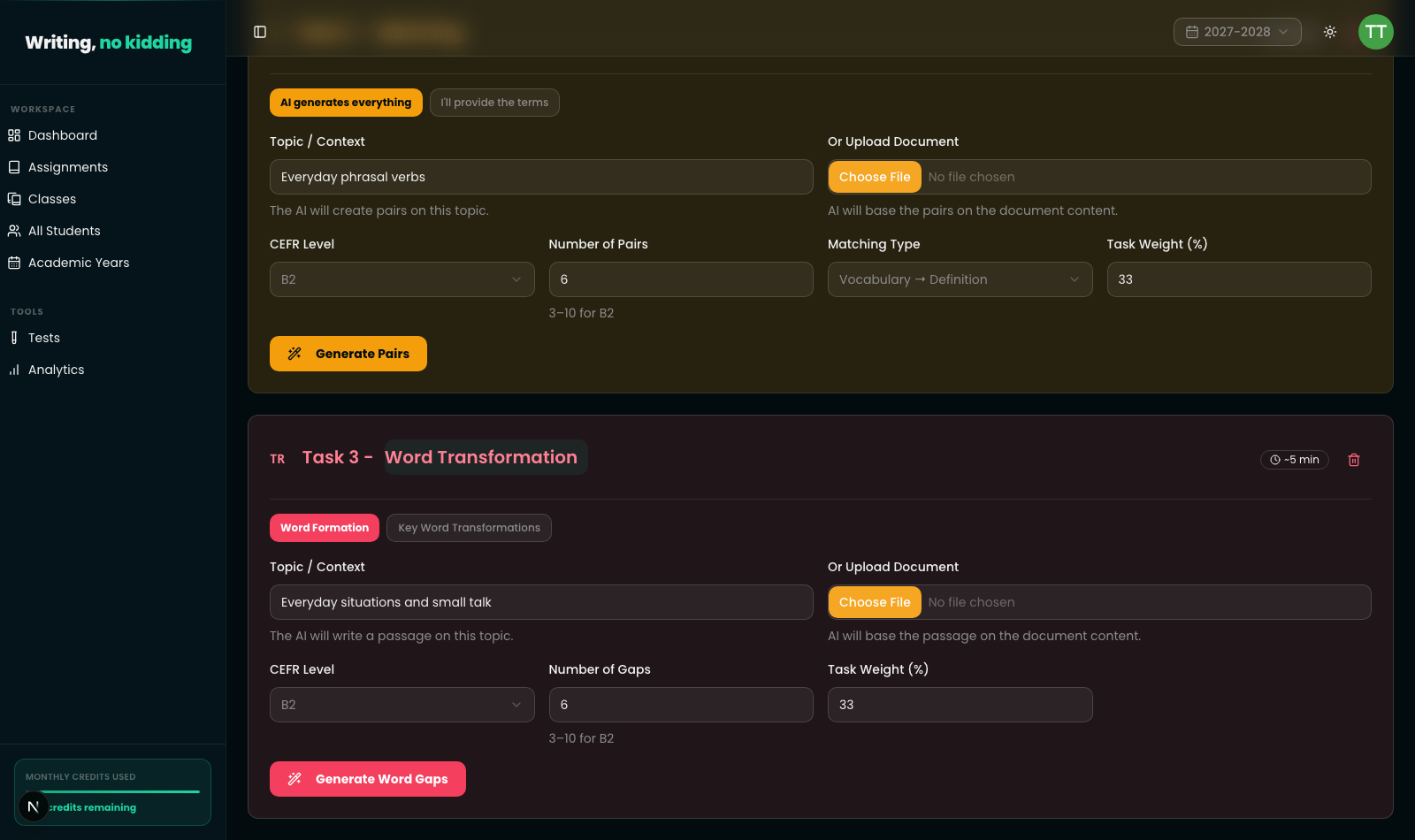
For Word Formation, you set a topic ("Everyday situations and small talk"), a CEFR level, and a number of gaps (3-10 at B2, up to 15 at C1/C2). AI writes an original passage with numbered blank markers and shows the transformed answer plus its root word inline once generated — for example a gap based on CHALLENGE resolving to challenging. You can also upload a document instead of giving a topic, and the AI will base the passage on that content.
For Key Word Transformations, you give a topic instead of a passage, and AI writes standalone sentence pairs: an original sentence, a keyword, and a gapped rewrite the student has to complete. Because grading a paraphrase is inherently more subjective than checking a single transformed word, this subtype leans on AI-assisted evaluation rather than exact string matching, while Word Formation grading works mostly against the accepted answer list.
Each subtype gets its own weight slider, so a Transformation Task can sit alongside a Writing Task, Quiz, Matching Task, Gapped Text, or Reading Comprehension task in the same assignment, with the weights summing to 100%.
Steps
- Open New Assignment from the teacher dashboard.
- Click Transformation Task to add it to the assignment.
- Choose the subtype: Word Formation or Key Word Transformations.
- Enter a topic/context (or upload a document, for Word Formation) and set the CEFR level.
- Set the number of gaps (Word Formation) or number of items (Key Word Transformations).
- Click Generate Word Gaps or Generate Sentence Items and wait for the AI draft.
- Review the generated passage or sentence pairs, adjust the task weight, and save the assignment.
Related articles
Ready to try this in your own classroom?
Related articles
How to Create Matching Exercises
Build vocabulary, collocation, and functional-language matching exercises in the Cambridge exam style.
How to Build Reading Comprehension and Gapped-Text Exercises
Create Cambridge-style gapped-text and reading comprehension exercises, with AI helping generate passages and questions.
How to Use Grading Standards: CEFR and Cambridge
Grade against CEFR (A1-C2) or Cambridge B2 First Writing band descriptors instead of a generic scale, so AI feedback matches a real standard.